
Source: Philadelphia Inquirer
SEPTA’s October tracking outage offers a practical reminder to understand what travel apps are showing, recognize the difference between scheduled and real-time arrivals, and keep a backup plan for unexpected disruptions.
SEPTA’s real-time tracking tools returned Thursday morning, October 22, after the agency took them offline Wednesday as a cybersecurity precaution. NBC10 reported that the website’s systemwide alerts were back around 7 a.m. following security updates. SEPTA’s restoration notice thanked riders for their patience while it installed the patches.
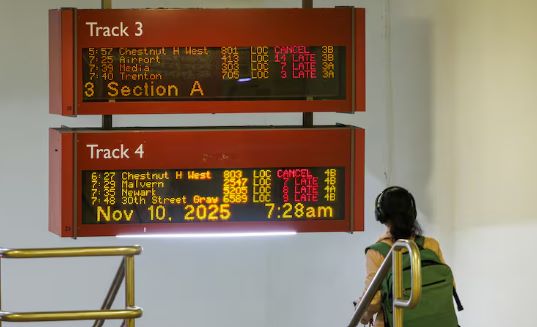
For anyone trying to get to work or make a connection, that information answers a small question with consequences: How long should I wait here?
The next time an arrival screen goes blank, a useful backup plan starts with knowing what information has disappeared. A missing prediction does not, on its own, confirm that a trip has been cancelled.
Here are seven ways SEPTA riders can stay informed and make better travel decisions when tracking tools become unavailable.
1. Understand Why SEPTA’s Tracking Tools Went Offline
SEPTA disabled the tools in response to federal cybersecurity recommendations concerning PHP, a programming language used by the affected services. Federal officials had recommended installing security updates or taking affected services offline until they could be secured. SEPTA restored its tools after installing patches.
That account describes a precautionary shutdown. It does not establish that SEPTA suffered a successful cyberattack or that riders’ personal information was stolen. Neither conclusion should be attached to the announcement without evidence.
The same care applies to travel decisions.
An unavailable tracking tool and a cancelled bus are separate problems. Check for an actual service notice on your route before assuming that the vehicle will not come.
If the notice concerns arrival information, you still need to establish whether your trip is running.
2. Know the Difference Between Scheduled and Real-Time Arrivals
A departure time on a phone can mean a published schedule or an estimate informed by live information. Google’s guidance says some transit stations in Maps show real-time departures while others show scheduled departures.
For a trip in Google Maps, enter your destination, choose Directions and select Transit. Check the starting location and departure date and time before choosing a route.
A search saved yesterday may not describe the trip you intend to take today.
Google’s departure guide also explains its color indicators:
- Green: The vehicle is on schedule.
- Orange: The vehicle is running early.
- Red: The vehicle is delayed.
- Black: The information is not updating in real time.
Green, orange and red indicate information that is updating in real time. Black indicates that it is not. Read those indicators alongside any service notices.
If you are choosing between two departures, check each one. Live information for an earlier vehicle does not establish that a later trip is also being tracked.
3. Learn How to Read Arrival Predictions in the Transit App
Transit, the separate travel app, offers another visible clue that can help riders distinguish live predictions from posted schedules.
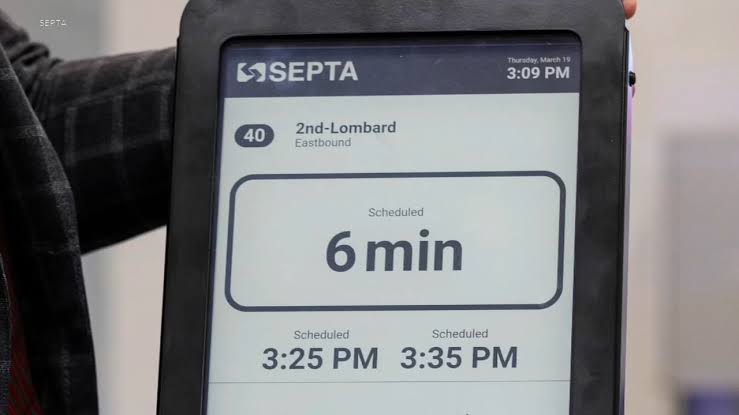
According to its help guide, two pulsating waves beside a departure countdown indicate real-time information. Greyed-out times without those waves show the posted schedule and do not reflect delays or service changes.
Transit also distinguishes between confirmed and estimated cancellations.
An agency-reported cancellation is marked “Cancelled,” while the app may label its own estimate “Likely cancelled.”
Those descriptions are not interchangeable.
That distinction matters when a connection is close. If the next bus is displayed only on a schedule, treat that time as the planned departure. Leave room for uncertainty where you can, and look for a service alert before deciding that a tight transfer will work.
Source: 6ABC
4. Keep a Second Travel App Ready, but Understand Its Limits
During the October outage, riders could still get real-time information through the free Google Maps app and the subscription-based Transit app.
Officials said Transit had agreed to temporarily remove its paywall to help SEPTA riders. That agreement concerned the outage, so riders should check current access before assuming a normally paid feature is still free.
Having another app available gives you somewhere else to look. It does not guarantee a live prediction.
Transit explains that agencies supply arrival information and that riders using its GO feature can also contribute vehicle-location information.
Check whether the particular departure you need actually has a live indicator. For trips you make often, save the route and your stop information while you have time to check them. Include the direction of travel.
If you use a screenshot, keep the date and time visible so you can tell when it was captured. A picture of an earlier arrival estimate cannot update as traffic or service changes.
5. Save Transit Schedules for Times When Mobile Data Is Unavailable
A backup travel plan should not depend entirely on having an internet connection. Transit says it downloads schedules in the background after you open the app while connected to the internet. Those schedules and route maps can be available offline. Without a connection, however, real-time arrivals and service alerts are not available.
Open the app and check the route you need while you still have a connection, then confirm you can find it.
Remember that a downloaded schedule shows planned departures. It cannot tell you about a disruption that happened after the information was downloaded.
You can also write down your route, boarding stop and connection point. Keep one alternative route if there is a practical one. Decide what would make you use it: a confirmed cancellation, a detour affecting your stop or a missed connection. That is more useful than switching routes simply because one screen failed to load.
6. Know How to Contact SEPTA When Your Apps Cannot Help
When digital tools are unavailable or provide incomplete information, riders can contact SEPTA directly.
SEPTA lists the following customer-service numbers:
- Customer Service: 215-580-7800
- TDD/TTY: 215-580-7853
Its published customer-service phone hours are:
- Monday through Friday: 7 a.m. to 7 p.m.
- Saturday and Sunday: 8 a.m. to 5 p.m.
The main customer-service line offers help in more than 200 languages. Before calling, have your route number, direction of travel and stop name ready.
Keeping the phone number somewhere accessible without opening a travel app can save time when an outage occurs.
7. Choose a Backup Route That Works for Your Time, Budget and Needs
If you are trying to reach a work shift or collect a child, a proposed workaround has to fit the time you actually have. Paying for a ride may be beyond your budget. Before choosing another route, check the walking involved and whether you can make its connections. A route that looks possible on a map may not work for you.
SEPTA and the companies supplying travel information should make that planning easier.
An outage notice should identify which tools are unavailable, say whether the notice concerns information or vehicle service, and point riders toward working alternatives.
Where a workaround involves a subscription, the notice should explain what is free and for how long. Clear communication helps riders distinguish a temporary loss of arrival information from an actual disruption to their journey.
What SEPTA Riders Should Remember Before Their Next Trip
Thursday’s restoration returned riders to their usual tools, but the October outage offers a practical lesson about depending on real-time travel information.
A tracking screen can help riders decide when to leave home, how long to wait and whether a connection is possible. When that information disappears, the most useful response is not necessarily to change routes immediately.
First, establish whether the service itself is affected. Then check whether the arrival time is live or scheduled, look for an official notice and consider an alternative only when it makes sense for your journey.
Before your next trip, take a moment to find the schedule indicator in the app you use, save your stop information and keep SEPTA’s customer-service number somewhere you can reach it without opening that app.
A few minutes of preparation may make the next tracking outage easier to navigate.